


You have invested in a Creality printer and want to realize your most beautiful designs with affordable, high-quality Creality filament. However, things often go wrong: stringing, warping, or insufficient accuracy. With the right approach, you can take every project to the next level. In this guide, you will learn step-by-step how to achieve consistent results with Creality filament, regardless of whether you are a beginner or already have experience.
The material properties of your filament
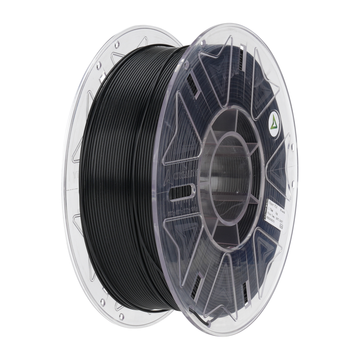
Every roll of Creality filament begins with an understanding of its material properties. Most Creality rolls consist of PLA, PETG, or TPU, each with its own melting point, elasticity, and adhesion properties. PLA runs smoothly around 200 °C, is rigid, and is biodegradable. PETG requires around 240 °C and offers more impact resistance and heat tolerance. Finally, TPU is surprisingly flexible and melts at approximately 220 °C, but it places higher demands on the extruder. By knowing these properties, your hardware settings will seamlessly match the filament, preventing problems from the very first layers.
Storage and drying schedule for optimal results
Preparation is the key to success when using Creality filament. Moisture in the strand causes bubbles, underextrusion, or a matte, porous layer structure. Therefore, store the spool in a sealed dry box with silica gel. If your filament has absorbed moisture, dry it for about four hours at 45 °C in a filament dryer or oven. Additionally, check the spool tension before every print: mounting it too tightly causes lateral compression in the Bowden tube, while too loose leads to slipping in the drive wheels. A smooth, straight filament path prevents kinks and folds.
Hardware adjustments for smooth printing
Your hardware is perfectly suited for Creality filament. The standard Bowden extruder works fine with PLA, but quickly causes friction with TPU. For flexible materials, consider upgrading to a direct-drive extruder. This reduces compression and improves the retraction of soft filaments. For PETG and PLA, a flat, well-calibrated print bed with build plate foil or a PEI sheet is usually sufficient. Ensure the nozzle has no play and regularly check the drive gear tension. This keeps the feed stable and prevents irregular filament depths in the final object.
Essential slicer settings
The right slicer settings make the difference with every type of Creality filament. Start with the manufacturer's recommended temperature and experiment by increasing or decreasing it in 5 °C increments. For PLA, 200–205 °C is ideal; PETG requires 240–245 °C; and TPU prints smoothly at 220–225 °C. Lower the print speed to 30 mm/s for flexible filament and keep retraction limited to 1 mm at 20 mm/s. Set cooling to maximum for PLA, 50% for PETG, and turn off the fan for TPU so layers bond well. Use a 0.16 mm layer height with a 0.4 mm nozzle to combine speed with sharpness.
Preventing and quickly solving problems
Despite all preparations, unexpected challenges can always arise. Stringing is a classic issue with Creality filament: molten threads stretching between parts of the object. Reduce retraction distance and activate Pressure Advance or Linear Advance in your firmware to counter this. To prevent warping with PETG or PLA on large surfaces, use a heated bed at 60 °C and an enclosure to keep out cold air. Underextrusion, visible as gaps or thin lines, usually points to a clogged nozzle or moist filament. Clean the nozzle, dry your filament again, and calibrate the Z-offset to within 0.1 mm.
Post-processing for a professional finish
After printing, thoughtful post-processing helps achieve professional results with Creality filament. Carefully remove excess support structures with flat-nose pliers. Remove fine fibers with a heat gun set to 180 °C, which smooths the surface finish without blurring details. For PLA and PETG, you can apply a short annealing cycle (60 °C for two hours), which improves mechanical properties and heat resistance. Only measure dimensions after full cooling; the filament remains elastic until the temperature drops, at which point the object permanently sets.
Applications and creative possibilities
Whether you are working on a scale model, a functional part, or a decorative object: the possibilities are endless. From custom cabinet knobs and cable ducts to advanced prototypes for technical applications, you can iterate quickly and continuously improve your design. Thanks to short lead times, you see immediate results and can easily vary shapes, textures, and strength properties. Applications outside the hobby world, such as instrument parts or educational teaching materials, also lend themselves perfectly to this production method. Thus, your printer offers not only creative freedom but also concrete solutions for a variety of issues.
Our checklist for quick success
- Use PLA for easy prints and quick prototyping
- Choose PETG for durability, impact resistance, and heat tolerance
- Switch to TPU for flexible, shock-absorbing parts
With these categories in mind, you can effortlessly select the right Creality filament for your application.
AC PRODUCTS stands for quality and support
Ultimately, your approach determines the success. Invest in original spools, monitor humidity, fine-tune hardware, and adjust slicer settings per material. AC PRODUCTS supplies Creality filament with guaranteed diameter tolerances and offers extensive technical support. This helps you avoid trial-and-error and takes your prints to a professional level in no time. With attention to every detail, you will enjoy reliable, accurate, and durable 3D objects for longer.


Leave a comment