


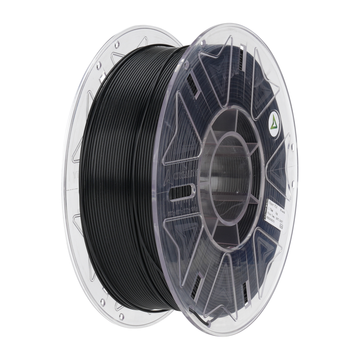
When placing a design on the build plate, you want the end result to be crisp and reliable. Choosing Creality filament is a first, crucial step in this process. This material is known for its consistent diameter and neat winding on the spool, two properties that prevent many printing frustrations. Yet, a technique is only as strong as its weakest link. That is why, in this guide, we look at how to maintain control over the variables that determine quality from the very first moment, so you get the most out of every roll.
Dryness matters more than you think
Even the best material fails when it absorbs moisture. Creality filament consists of hygroscopic polymers that bind water in high humidity. During the melting process, this water evaporates, causing air bubbles and weak spots in the layer structure. Therefore, store each spool in an airtight bag or container with silica gel. If a roll develops some noise or hissing during extrusion over time, dry the material for two hours in a special filament dryer or an oven at a low temperature. This simple routine not only increases print quality but also extends shelf life.
Temperature conditioning prevents stress
You likely recognize this: you unpack a roll from a cold storage room, put it directly onto the printer, and the filament breaks at the extruder. This is caused by thermal stress. Let Creality filament acclimatize to room temperature for thirty minutes before placing the spool. Unroll and rewind the material manually a few times; this prevents kinks that could later cause a feed jam. A little preparation saves you many restarts and scrap material. Note that the ideal extrusion temperature can vary slightly between printers. Therefore, always test a short temperature tower to find the sweet spot for your machine.
Balance in speed and cooling
Once the machine is running, speed, nozzle temperature, and fan speed together determine layer adhesion. For Creality filament, a moderate print speed of fifty to sixty millimeters per second is often ideal. Keep the nozzle temperature within the range specified by Creality and adjust ventilation according to the material type: PLA benefits from firm cooling, while PETG prefers a mild airflow. Don't forget to match the retraction distance to your Bowden or Direct Drive system. Those who invest time in a one-time test print with variable settings immediately document a base profile for all future projects. This allows you to work efficiently and avoids having to search for settings again and again.
Material choice makes the difference
Not every project requires the same properties. You can keep an overview with the following brief comparison:
- PLA: easy to print, low shrinkage, ideal for prototypes and decor.
- PETG: stronger and more heat-resistant, suitable for functional outdoor parts.
- ABS+: higher temperature resistance, though it requires a closed printer environment.
- Silk-PLA: shiny finish for display models, slightly more brittle than standard PLA.
By making a conscious choice, you prevent a visually stunning object from failing later under mechanical stress. AC PRODUCTS keeps all variants in stock, so you can quickly find the right Creality filament for every application.
Step-by-step fault diagnosis
Even with the best preparation, a model can fail. If delamination occurs between layers, first check whether the nozzle temperature is too low or the enclosure is draft-free. If you see stringing, lower the nozzle heat or increase the retraction speed. Warping on the build plate usually indicates insufficient first-layer adhesion or uneven bed leveling. Always test problematic settings with small calibration models; this way, you use very little Creality filament while seeing results quickly. Note findings in a logbook so that you don't start from scratch on your next project.
A healthy workspace
Polymer vapors are released during melting. Although Creality filament prints relatively cleanly, good ventilation remains important—especially with ABS-like materials. Put the printer in a closed cabinet with a simple carbon filter or place it in a ventilated room. Keep flammable objects away and use a smoke detector for extra peace of mind. This protects you and also extends the lifespan of the printer; dust and vapors adhere less quickly to fans and rails, reducing the need for maintenance.
Service and advice from AC PRODUCTS
With a rapidly growing range, it is nice to have a partner who keeps the overview. AC PRODUCTS tests every batch of Creality filament for dimensional accuracy, diameter consistency, and color deviation before it hits the shelves. In addition, you get access to verified slicer profiles so you don't have to experiment endlessly. Questions about a specific application? Our technicians can update you on impact strength, food safety, or UV resistance. This allows you to make informed choices and save on failed productions. Should a roll ever fail to meet expectations, we will arrange a quick, hassle-free exchange.
Conclusion: More control, fewer failed prints
By handling storage, temperature, and printer settings carefully, you utilize the full potential of Creality filament. Keep rolls dry, let them acclimatize, and calibrate the machine based on small test objects. Then, choose the type of material that fits your goal and ensure a safe, well-ventilated workspace. AC PRODUCTS supports you with quality control, clear profiles, and practical advice. This way, you convert every meter of filament into a reliable end result and prevent waste. Future projects will no longer begin with doubt, but with confidence in stable prints—exactly what professional 3D printing should offer.


Leave a comment