


You are considering producing an object that needs to bend, bounce back, and resist wear without compromising on dimensional accuracy or detail. In such cases, TPU 3D filament is the solution. In this article, we will guide you step-by-step through the properties, slicer settings, typical applications, and common pitfalls so that you can reliably produce elastic parts from your printer in one go. We use “you” throughout, because your projects are our focus.
Why specifically TPU?
Thermoplastic polyurethane owes its reputation to a rare combination of rubber-like elasticity (up to 600%) and thermoplastic processability. Prints made from TPU 3D filament absorb shock, tolerate oils and greases, and remain structurally stable between -30 °C and +80 °C. Unlike silicone, they can also be welded or bonded using standard resins. This makes the material just as popular with product designers as it is with hobbyists.
Choosing hardness: Shore A is more than just a number
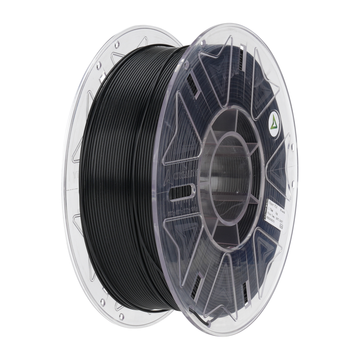
AC PRODUCTS supplies TPU 3D filament in hardnesses from 85-A to 98-A. An 85-A band feels almost like a rubber ring and requires a direct drive extruder to control the flexible strand; 95-A is firmer, can be fed through many Bowden setups, and functions perfectly as a robot wheel or impact buffer. Therefore, always keep your extruder type and end application in mind before ordering a spool to avoid an expensive repeat purchase.
A summary: The slicer settings that really count
- Nozzle temperature 225-240 °C: start low and increase in steps of 5 °C until the perimeters flow silkily.
- Bed temperature 50-60 °C: just enough to allow the first layer to adhere without excessive oozing.
- Print speed 25-35 mm/s: going faster increases the risk of slipping in the feeder.
- Retraction distance 0.5-1.0 mm at 25 mm/s: less is more; too much retraction will buckle the flexible filament.
- Fan speed 20-40% part cooling: just enough to limit stringing, not so strong that the layers delaminate.
- Flow correction 105%: compensates for the slight rebound of molten TPU.
- Nozzle travel >150 mm/s: fast movements minimize stretching of the strand and limit strings between parts.
With these values as a starting point, you will usually reach the perfect balance between detail and elasticity within one or two prints.
Typical applications: Flex with function
In the design studio, parts made from TPU 3D filament come to life as grippy phone cases, drone landing gear, and custom cable grommets. In industry, soft jaws are printed to fix fragile workpieces in place without leaving scratches. Orthopedic technicians scan a patient and print splints in which rigid PLA segments fuse directly with TPU zones without assembly, without glue.
Pitfalls and their remedies
Common frustrations are stringing and “pulley slip.” You can almost always solve stringing by drying the filament for two hours at 50 °C and lowering the nozzle temperature by 5 °C. You can reduce slippage with a dual gear extruder or by slightly increasing the spring tension of the pressure roller. Do the first layers look like chewing gum? Then increase the Z-offset by 0.05 mm; TPU 3D filament swells slightly more than PLA when it leaves the nozzle.
Hybrid prints: One object, two functions
More and more FDM printers offer a second extruder or a quick-change hotend. If you combine hard PETG frames with enclosing TPU cushions, you save assembly time and create water- and dust-tight interfaces. Think of electrical housings with integrated gaskets: first the machine prints the rigid shell, then it switches to TPU 3D filament and injects a closed sealing rim in the same session. The result is an IP-rated box with no post-processing.
Storage, moisture, and recycling
TPU absorbs up to 1% moisture in 24 hours, which results in tiny steam bubbles and a matte print. Therefore, store open spools in a dry box with silica gel or in a vacuum bag. Is the spool damp after all? Two hours in a convection oven at 50 °C fully restores the filament. Don’t throw away scrap pieces: AC PRODUCTS accepts waste returns by the kilo and extrudes this into “Eco-TPU,” excellent for non-critical prints like bumpers and test pieces.
Service from AC PRODUCTS
When you order TPU 3D filament from AC PRODUCTS, you receive not only a spool of high-quality material but also ready-to-use Cura, Prusa, and Orca profiles optimized per shore value. Our engineers are available every Tuesday and Thursday to join a live session and check your slicer settings, so you can get started quickly without endless fine-tuning. Do you want to test it first? We are happy to send a sample pack of three ten-meter lengths so you can calibrate your printer before going into large-scale production. Furthermore, we reward sustainability: you can return empty spools for recycling, after which you will receive a discount on your next order. This keeps the learning curve low, costs predictable, and the printing process with TPU 3D filament just as flexible as the end product.
Conclusion
Those who choose TPU 3D filament acquire a material that works like a digital toolbox: you print custom sealing rings, wear-resistant cable clamps, and dampers exactly to size, in one production run, without external suppliers. By consciously choosing the shore hardness, following the slicer settings mentioned above, and taking moisture management seriously, you will deliver parts that last for years. If you combine that with the support of AC PRODUCTS, every project will remain flexible—literally and figuratively. Good luck with your next print!


Leave a comment